Image to Text Converter
Quickly and accurately extract text from scanned documents, photos, handwritten notes, and screenshots by using this image to text converter to convert images into editable text.


How to Use Image to Text Converter Online?
Follow these three simple steps to extract the text from the picture.
- Upload images or drag and drop, select from your computer, or paste them directly.
- Choose Simple OCR for plain text or Formatted Text to keep the original formatting.
- Click "Submit". Our image to text converter will quickly process your images and provide the text in a digital format.
- In just seconds, save your converted text to a .txt file, download it, or copy it to your clipboard.

Why Use Photo to Text Converter?
Here are the benefits of our picture to text converter that make it stand out:
Manually extracting text from images and documents is a tedious task that takes a lot of time and effort. On the contrary, our image to text converter helps you effortlessly extract text from photos and scanned documents.
Using OCR technology, our tool lets you convert both printed and handwritten notes into editable text. Our advanced image to text converter is efficient in extracting text from any image with accuracy. It allows you to convert any image to text with ease, including JPG, PNG, TIF, GIF, WEBP, and beyond.
How does the Image to Text converter work?
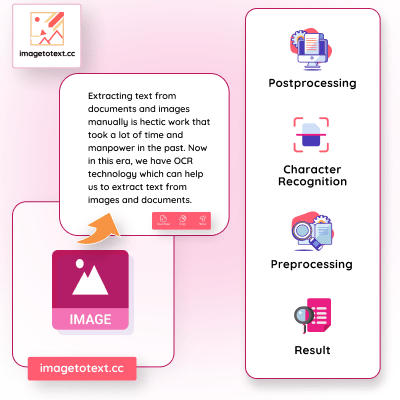
When it comes to converting images to text, OCR still stands as groundbreaking technology that employs optimized algorithms. If I explain OCR in simpler words, it transforms an image into bitmap binary data, where algorithms meticulously examine the lighter and darker regions.
It identifies darker areas as text, further classifying and filtering them into predefined patterns to recognize characters. Subsequently, the data undergoes post-processing to refine its accuracy.
This process can be defined in three straightforward steps:
- Preprocessing: Initial steps where the image is prepared for character recognition by enhancing and optimizing the data.
- Character Recognition: The core phase where algorithms analyze and classify darker areas as characters, applying predefined patterns for recognition.
- Postprocessing: The final stage involves refining and perfecting the recognized data to enhance overall accuracy and readability.
Key Features of Our Picture to Text Converter

Low-resolution image extractor:
Our image extractor tool is excellent at extracting text from blurry or low-resolution images with high accuracy, making it perfect for digitizing books, handwritten notes, and other printed materials.

Mathematical syntax detection:
With machine learning algorithms, our tool can detect mathematical syntax, ensuring that the converted text is accurate and free from errors.

Multi-language support:
Our image to text converter is a versatile solution for users worldwide as it can handle multiple languages, making it easy to extract text from images in various languages.

Extract Text images in all formats:
Our tool is useful and responsive for a range of applications because it can extract text from images in a number of formats, including JPEG, PNG, BMP, and more.

Batch Processing:
It lets you upload and convert multiple images at one time. Free users can upload up to 3 images at once, ideal for quickly converting multiple text-filled pictures. This saves a significant amount of time and effort.

Fast Data Processing Speed:
Our online image to text tool quickly processes images, saving time and enhancing productivity by handling bulk uploads and converting multiple documents without delays.
Amplify productivity in everyday tasks in multiple ways
Image to text conversion, often facilitated a wide range of applications across various fields.
Document Digitization and Archiving
Scanning Books and Documents:
Converting printed books and documents into digital text for easier storage,searching, and editing.
Historical Document Preservation:
Digitizing old manuscripts and records to preserve them and make them accessible for future generations.
Data Entry Automation
Automating Data Extraction:
Converting printed or handwritten forms into digital text to automate data entry processes in industries like healthcare, banking, and logistics.
Invoice and Receipt Processing:
Extracting text from invoices and receipts for easier accounting and financial
management.
Content Analysis and Research
Text Mining from Images:
Extracting text from images for analysis in fields like social media research, marketing, and journalism.
Research and Academia:
Converting printed research papers, articles, and notes into digital formats for easier reference and citation.
Personal Productivity
Note Taking:
Converting handwritten notes or whiteboard contents into digital text for easier organization and sharing.
Organization of Personal Documents:
Digitizing personal documents such as letters, recipes, and diaries for better organization.
E-commerce
Product Information Extraction:
Extracting product details such as product description, ingredient, price and etc from images for e-commerce listings and inventory management.
Security and Fraud Detection
Identity Verification:
Converting text from ID cards, passports, and other documents for verification purposes.
Marketing and Advertising
Content Creation:
Extracting text from images to repurpose content for marketing campaigns.


Frequently Asked Questions (FAQs)
What is an Image to text converter?
+
What types of images can be converted into text?
+
Is there another tool I can use to extract text from images?
+
How many images can I convert at one time?
+